Our team is developing a few database tools for the multi-database and multi-vendor environment. From time to time we face data comparison and synchronization problems. For example, after running our data generator in the scramble mode, we need to compare data in the source and target tables. It helps us review the scrambling quality and execution results. Out test environment contains dozens of configurations, therefore, the most important option for us is easily moving information about the database connection from one tool to another.
Comparison Results Presentation
The visual representation of the comparison results is important as well because it saves us a lot of time. Product customization and easy management are crucial for our testers and QA staff in our complex environment. Our customers inform our team about the same needs. Also, they ask for partial synchronization modes like "new rows only" or "updates only". Another required option is the support of file formats that do not support Primary Keys. All these goals and requirements tell us to design and develop our own data comparison tool.
|
There are two main difficulties with different types of database comparison and synchronization: databases support similar, but not identical data types. A synchronization script should use the SQL dialect related to the target database. However, our background and low-level database libraries help us create a flexible and comfortable tool that complies with all our and customer's requirements. Currently, we use the created data comparison tool in our work. We've decided to describe a few tips for this tool concerning the requirements and needs mentioned above. The connection dialog box of the data comparison software has the Save and Load buttons for connection profiles (the current version uses an INI file to store them). This feature helps the user export and import information about all defined connections with one click. Now we can copy connections from one system to another as well as from one of our tools to another within seconds. |
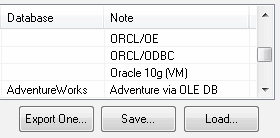 |
After the comparison process is complete, the program shows the results in three colors: green for identical items, red for different items and yellow for items that have no items corresponding to them in the other table. This approach to visualization helps us see all differences at a glance. Also, the comparer can create optional HTML reports with the comparison results using the same color scheme.
|
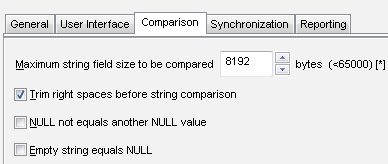
Important note: to compare large-scale tables, switch to "Show different rows only". With this option enabled, the comparison software produces really small reports if there are no many differences. Moreover, the program works much faster in this mode. Another useful option is "Trim right spaces before string comparison". It helps the user compare different data types like CHAR with VARCHAR without conversion or other additional steps. There are two modes for the NULL value comparison and synchronization. By default, the program considers all NULL values identical. The user can switch this mode to an alternative one with the corresponding option in the Settings dialog box. |
 |
For Microsoft SQL Server the program has two levels of identity values support. In the first case, DTM Data Comparer ignores identity columns. In the second it inserts original identity values.
Please note that the comparer can work with views and synonyms as well as with database tables. Data synchronization is also supported for updatable views.
Synchronization Features
|
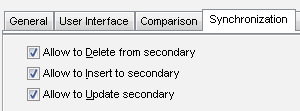
As mentioned in the requirements list the program allows users to customize synchronization process with three options. They are:
|
 |