DTM Data Generator is a professional tool to generate test data which is able to work equally well both with databases and with plain text files. In most cases the product enables you to create realistic test data without any special efforts. Let's dwell on some practical tasks of filling the database with test data.
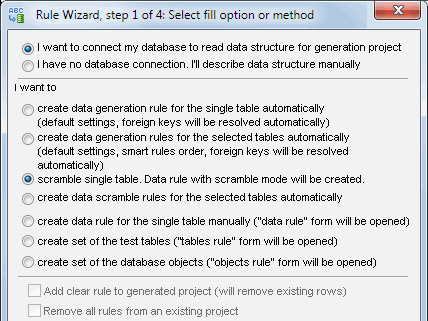
One of the most complicated tasks of creating test data set joining several database tables is a foreign key constraint. The mechanism of automatic determination of the correct order of filling the tables considering this factor is realized in this SQL data generator. "Rule wizard" enables you to select the necessary tables and then the program itself will create a set of rules to fill the table according to the individual properties and the default rule properties of each table. You can view and edit the automatically created project right after its creation.
Let's dwell on some problems the users often face when they need to fill string values with numeric data. There are two simple mechanisms which can be of help - using random values by the mask and incremental fill method.
If you need to fill the text field with a fixed number of digits you'd better use a fixed mask, for example, the NNNN mask will generate four digits sets. For the cases when you want to get variable length values you should use an iterator, for example, according to the N{9} mask the program will create strings of sequences of digits from 1 to 9 in length. When adding fixed values or characters to the mask you can get more complicated sets, for example, $NN.00 mask will create integer two digits strings with a $ character in the first position.
When using the incremental method combined with string data the main problem is to choose the resultant value format as well as leading zeros adding. This problem is easily solved by using format strings. The program enables you to use C/C++ like format strings to describe the appearance of generated data. Let's dwell on some examples. The %06d format corresponds to the integer number of 6 digits with zeros added on its left if necessary. The $%2d.00 format looks like the $NN.00 mask from the previous example according to the results of its usage but it doesn't contain the non-significant zero on the left.
Test Data Preparation Methods
The incremental method offers three options for data generation: sequence start value, incremental step (may be negative) and a pointer how many times each value can be used. For example, we are to build a sequence: 0,0,0,2,2,2,4,4,4: In this case 0 must be used as a start value, 2 as a step and each value must be used three times. Use 0 as a step if you want to fill the field with a constant value, though it may be more effective to use the list of one value.
Working with the lists of predefined values enables you to make the created data
more realistic, and in some cases (check constraints occurrence) it is the only
way to fill the field correctly.
You can fill the lists in three different ways: by specifying the list values,
using the text file with necessary values and using the Values Library.
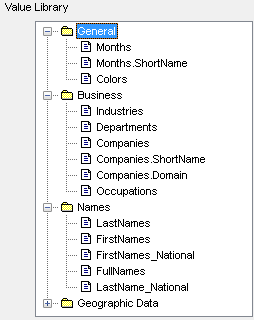
Unlike random data generators, this software uses the predefined library to make data more realistic. Value Library is a hierarchical repository containing frequently used data sets such as names, geographical names, posts, etc. Predefined Value Library is distributed and updated by the product developer and can't be extended by the user on his/her own. Instead of it the user may create custom values library with Library Builder. Also, if you have the file with data you should use it just specifying its name in the "from disk file" method.
Any of the mentioned above filling methods means that the values set must not be used at random (choosing random values) but in sequence. When the program reaches the end of the set or the file it will take the first value again, etc.
The method which uses a direct value set has a wider set of features as it enables you to specify the density of distribution of this or that value while the others use the uniform distribution. This mechanism often helps you to make the generated values more appropriate for the task. For example, in case the company clients make 10% school children and 10% students you can specify the necessary values in the "% usage" field when creating the list so that the program can consider it when generating test data. If the probability for several values is specified and for others is not the program will first consider the specified values and after that distribute the remaining values equally between the unspecified ones. For example, if we have four values: A, B, C, D and the 10% probability is specified for B and 20% for D and is not specified for the remaining values, and C will be equiprobable to 35%.
Mask using as a list element is supposed to be quite an effective way of
making the generated values more realistic. This mechanism can be used when
specifying the value directly as well as when selecting the values from the
file specified by the user. Moreover, the program enables you to interpret the
values selected from the attached table as a mask. For all these cases there
is a special checkbox to check/uncheck the option.
So, we want to fill the field with the values of the Internet domains names,
and in 10% of the cases they will be located in the "gov" zone, in 5% in the
"org" zone and all the rest - in the "com" zone. To get the data let's select
the "from list of values" method, create a set of three values
www.aa{10}.com, www.aa{10}.gov, www.aa{10}.org and specify the % usage
for the first value - 85, for the second one - 10, and for the third one -
5 (you can as well leave it empty for the program to calculate it automatically).
The program will create the necessary number of values with the specified density,
each name containing from 2 to 11 random letters.
Table to Table Relationships
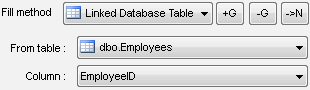
In some cases, the table field should be specified according to the values already contained in the database. In order to do it, Data Generator gives you two mechanisms: using the specified field from the table selected by the user ("From Database Table" method) as well as generating values as a result of custom SQL statement executing. In case the table field is a foreign key the program uses the first mechanism independently to provide the generated data integrity.
There are two extra ways for the first mechanism to limit the list of values which will be selected from the attached table and used while being generated. You can specify the WHERE clause in an explicit form directly in the rule or limit the maximum number of the used values by editing the corresponding field in the "Settings" dialog (the default value 2000; 0 means no limits). For example, if you want 1000 values from the Customers table, ID field to be used for the clients registered in the database after 01.01.2002 you should specify 1000 as a limiter in the settings and then use the "From Database Table" method specifying the necessary pair Table+Column and entering the limit of the kind RegistredDate>'01.01.2002' to the "Where" field.
How to Use Custom Data Generators
Custom SQL statement is more convenient to be used for complex queries as well as to apply to the built-in functions of your DBMS. For example, if you want to fill the field with current date/time values, you should use the "by SQL statement" fill method with "select getdate()" as a statement (for MS SQL Server). It's important to mention that the choice from the attached table is a much more effective way of filling as the application to the server happens only once at the beginning of the list creation.
The program enables you to work with text files in case of no connection to the database. In this case, the user can specify the structure of the target file (the field list, their names, and their type) manually. On the basis of this, the program can create the descriptions both of the plain text files and the sets of insert SQL statements which can be moved to another system or another platform to be executed.
If you want to create a file with no connection to the database you can use the rule wizard selecting the "no connection" mode on the first tab or create a data file rule manually. Advice: if you are going to work with no connection with the database constantly uncheck the "ask for connecting" option in the settings. Otherwise, the program will ask for the connection to the database at every startup.