Data Comparison and Synchronization Software Overview
DTM Data Comparer is a visual tool for data comparison and synchronization. The program successively views the rows of two tables basing on the order of ascending of primary or unique key values. If the tool cannot find two records with the same key value, it places the records to different lines and highlights in yellow. For equal key values, the program places them to the same line and highlights equal fields in green and unequal fields in red. When the user defines mapping the program leaves columns that don't take part in comparison white.
Download free demo version
Key Features of the Comparer
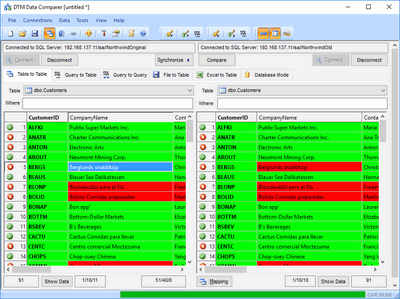
- There are six comparison modes: table to table, query to table, query to query, text file to table, Excel spreadsheet to table and database.
- The tool can compare tables in the same or in the different data sources.
- Visual comparison process and HTML-report make the process more user friendly and intuitive.
- Excel and XML reports help the user to analyze differences in the data by external tools.
- Mapping feature helps users to compare tables with different data and key structures.
- Database independent. The user is enabled to compare a table in the Oracle database with a table in MySQL as well as an Interbase table with a table in the DB2 database. The desktop files like SQLite or Microsoft Access can be also compared. DTM Data Comparer supports all unified database interfaces (ODBC, IDAPI, OLE DB) and Oracle Call Interface.
- DTM Data Comparer is a Windows application. It supports Windows XP, Vista, Windows 7, Windows 8/10 (desktop), Windows Server 2003 and newer. x64 version of the software is also available.
Why DTM Data Comparer
- Easy to use interface makes the comparison or synchronization process comfortable and intuitive.
- The custom key support feature helps users to compare desktop files without Primary Keys.
- High performance. You can compare and synchronize large-scale data sets with this tool.
- Multivendor environment support: ODBC, OLE DB, IDAPI, and Oracle Call Interface.
- Customizable and localizable HTML data differences report.
- Console (command line) mode helps you to integrate with Windows Task Schedule and to run your synchronization process on a schedule, overnight etc.
See Also
- Database comparison and data sync software selection guide (PDF)
- Data comparison process in DTM Data Comparer