Compare and Synchronize IBM DB2 Databases with DTM Data Comparer
DTM Data Comparer provides DBA or database developer a visual way to compare or even synchronize DB2 databases. However, unattended console mode for scheduled comparison and synchronization is also available.
DTM Data Comparer fetches data rows of tables to be compared basing on the order of ascending of primary key or user defined unique key values. If the program can't find data rows with the same key value, it places the records to different grid lines and highlights row by the yellow background. In case values of the keys coincide, the program places them to the same lines and highlights cells for equal fields by green background and different fields by the red background.
The comparison tool provides a way to compare tables with a different structure. It is a column mapping feature. Moreover, some conversion by built-in DB2 functions can be applied to target table during data synchronization. For example, the user can change date format by DATE function.
Download free demo version
Key Product Features
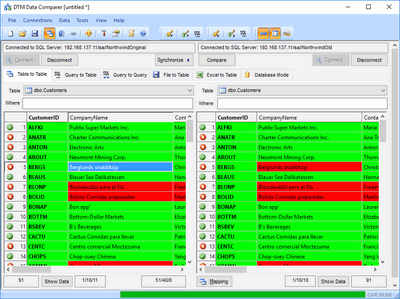
- The software can compare tables in DB2 tables as well as compare DB2 table with another data source like MySQL or even Excel spreadsheet.
- You can compare data at different platforms: the comparer launched at windows system can compare databases at Linux and AIX systems over the network.
- Rich comparison report with two modes allows users to understand differences between tables or databases.
- Mapping and conversion features make comparison and synchronization more flexible.
- The comparison report can be customized by HTML/CSS and localized (sample report).
- The unattended mode allows execution by task schedulers. The user can run comparison or synchronization process on a schedule, over night etc.
- DTM Data Comparer is a true Win32 application, supports Windows XP, Vista, Windows 7, 8/10 (desktop) and Windows Server 2003/2008/2012/2016. x64 version of the tool is also available.
Why DTM Data Comparer
- Uses ODBC driver for DB2, no additional software is required.
- Custom key definition enables the user to compare DB2 data with desktop databases or spreadsheets (Excel, DBF, Access, etc).
- High comparison performance. The user can compare millions of rows with this tool.
- Powerful yet simple user interface for database professionals.
See Also
- Database comparison and synchronization utility selection guide (PDF)
- How does data synchronization process work?
- Comparison modes: table to table, query to table, text file to table, Excel spreadsheet to table and database.