Compare and Synchronize Oracle Databases with DTM Data Comparer
With DTM Data Comparer software any DBA or database developer can compare or even synchronize Oracle databases in a visual manner. The program uses fast and reliable Oracle Call Interface to access databases as well as traditional ODBC and OLE DB connections.
The program scans the contents of tables to be compared basing on the order of ascending of primary key or user defined unique key values. If the program can't find two data rows with the same key value, it places the records to different lines and highlights by the yellow background. In case values of the keys coincide, the program places them to the same lines and highlights equal fields in green and different fields in red.
The user can compare tables with different structure with column mapping feature. Also, the program allows the user to apply built-in Oracle functions to target database during data synchronization. It helps to make some kind of data conversion if necessary.
Download free demo version
Key Comparer Features
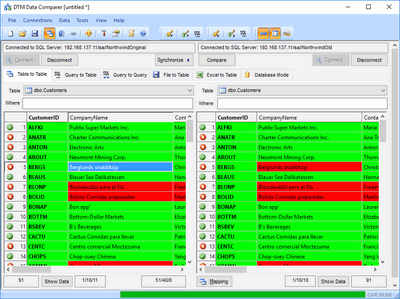
- The tool can compare tables in two Oracle tables as well as to compare Oracle data with another data source like Microsoft SQL Server, MySQL or even Excel spreadsheet or plain text file.
- Native Oracle interface (OCI) support.
- Visual comparison process and comparison report make data compare more user friendly (sample comparison report).
- Mapping feature helps the user to compare or synchronize tables with different structure of columns and keys.
- Conversion feature allows to apply simple data transformations based on built-in Oracle functions.
- DTM Data Comparer is a Windows application. The tool supports Windows XP, Vista, Windows 7, Windows 8/10 (desktop), Windows Server 2003 or newer. x64 version of the tool is also available.
Why DTM Data Comparer
- Powerful but intuitive user interface for database professionals and advanced users.
- It supports complete set of Oracle data type except nested objects.
- The comparison report with customization and localization options (example).
- Custom key definition feature helps the user to compare Oracle table with desktop files.
- High performance. You can compare and synchronize millions of rows with this tool.
- Console mode enables integration with task schedulers and run comparison or synchronization process on a schedule, over night etc.
See Also
- Data comparison tuning
- How the data comparison process work?
- Comparison modes: table to table, query to table, text file to table, Excel spreadsheet to table and database.