Compare and Synchronize SQL Server Tables and Databases
DTM Data Comparer is easy to use comparison and synchronization tool. It helps DBA or database developers to compare or even synchronize SQL Server databases in a visual manner. Also, it has console mode for scheduled comparison and synchronization. The software supports both full and express editions of the SQL Server starting 2000 version. The limited support for 6.5 and 7.0 versions is also provided.
The comparison software fetches MS SQL server tables basing on the order of ascending of primary key values. The user can define an alternate unique key. If the table has no rows with the same key value, the software places the records to different lines and highlights the data row by the yellow background. Otherwise, i.e. values of the keys accord, the program places them to the same grid lines and highlights cells for equal fields by green background and different fields by the red background.
With DTM Data Comparer the user is enabled to compare tables with a different structure. The column mapping feature allows specifying the correspondence between source and target tables. Moreover, the user can apply built-in MS SQL Server functions like CAST to a target value. This option provides data transformation for the synchronization process.
Download free demo version
Key Features of the Software
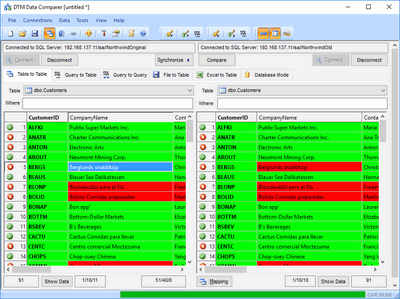
- The software can compare tables in two SQL Server tables as well as compare SQL Server table with another data format like Sybase or even Excel spreadsheet.
- Synchronization process tuning options: append-only, delete-only, full synchronization, etc.
- The tool can compare whole databases as well as pair of tables. Table to file and table to Excel modes are also available.
- The synchronous data grids scrolling option is useful for wide and large-scale SQL Server tables.
- Transaction size tuning helps to select optimal performance and transaction log size.
- DTM Data Comparer is software that supports Windows XP, Vista, Windows 7, Windows 8/10 (desktop), Windows Server 2003/2008/2012/2016. x64 version of the utility is also available.
Why DTM Data Comparer
- Uses SQL Server native client, no additional software is required.
- $DATE$ and $TIME$ macros help users to create a set of continuous comparison reports automatically.
- Rich HTML comparison report with color highlighting feature, CSS customization, and localization options.
- Supports two modes for Identity columns: ignore or synchronize.
- Two views for comparison results: grid (table to table) or row (values to value).
See Also
- Data comparison tuning
- Can the comparer help me to compare SQL tables?
- Comparison modes: table to table, query to table, text file to table, Excel spreadsheet to table and database.