Table of Content
- General
- Product profile
- Connect
- Comparison
- Warnings
- Synchronization
- Table to Table Mode
- Query to Table Mode
- Query to Query Mode
- File to Table Mode
- File to Table, Fixed width
- Excel to Table Mode
- Database Mode
- Synchronous Navigation
- Face-to-Face View
- Key Definition
- Column Mapping
- Settings
- Project Properties
- Script Viewer
- Command Line
- Console Mode
- Process Cancellation
- Comparison Report
- Report Customization
- Collate Window
- Table List Menu
- Run SQL statement
- SQL Console
- Hot Keys
- Information
Execute Synchronization Script
During database comparison process the program creates a set of insert, update and delete statements for data synchronization. The user can select the necessary statements or forbid the unnecessary ones in a special dialog box.
Also, he or she can save the produced set of SQL statements to a file on the disk with the statement delimiter specified in the settings.
COMMIT statements will be added according to settings as well as SET IDENTITY_INSERT ON/OFF.
The program shows a total number of generated synchronization statements at the left bottom corner of the window.
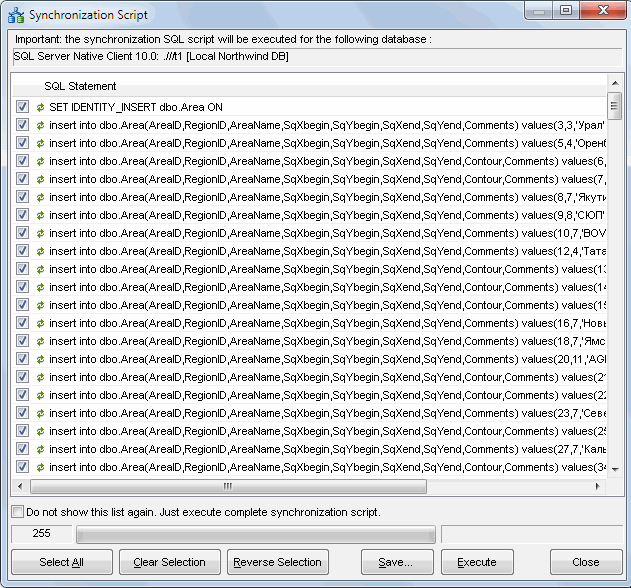
Note: the user can switch off this dialog opening by related option. The program will execute the whole script in this case.
See also: synchronization process.