Table of Content
- General
- Product profile
- Connect
- Comparison
- Warnings
- Synchronization
- Table to Table Mode
- Query to Table Mode
- Query to Query Mode
- File to Table Mode
- File to Table, Fixed width
- Excel to Table Mode
- Database Mode
- Synchronous Navigation
- Face-to-Face View
- Key Definition
- Column Mapping
- Settings
- Project Properties
- Script Viewer
- Command Line
- Console Mode
- Process Cancellation
- Comparison Report
- Report Customization
- Collate Window
- Table List Menu
- Run SQL statement
- SQL Console
- Hot Keys
- Information
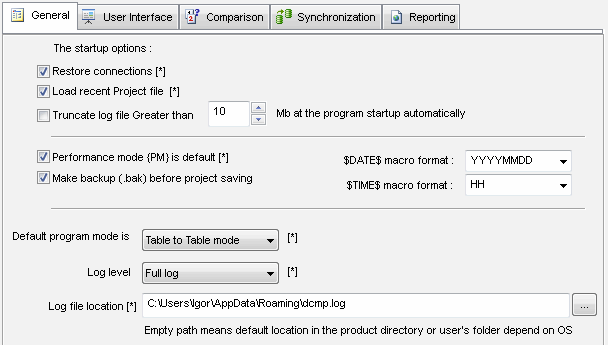
General Settings
| Option | Description | Default |
|---|---|---|
| Restore connection | Disabling this option will block restoring recent connections at the DB comparison program startup. | Yes |
| Performance mode is default | Switching performance mode 'on' or 'off' by default. | No (Off) |
| Load recent project | The indication that the program must load the last opened project when it is started. | Yes |
| Macros format | Format for $DATE$ and $TIME$ macros. | Empty, system default |
| Make backup | Should or no the program copy existing project file to .bak before overwriting it. | Yes |
| Default program mode | Mode that will be used after the program startup. Please note that project's settings (if present) overwrite this option. | Table to Table |
| Log level | Default, full or disabled | Default |
| Log file truncate automatically | Should the program truncate log greater the specified size or no. | No |
| Log truncation size | Size of file (Mbytes) for automatically truncation | 10 Mb |
| Log file location | Shows alternate log location or empty for default location (program directory). The user can enter or select another file. | Empty |