Table of Content
- General
- Product profile
- Connect
- Comparison
- Warnings
- Synchronization
- Table to Table Mode
- Query to Table Mode
- Query to Query Mode
- File to Table Mode
- File to Table, Fixed width
- Excel to Table Mode
- Database Mode
- Synchronous Navigation
- Face-to-Face View
- Key Definition
- Column Mapping
- Settings
- Project Properties
- Script Viewer
- Command Line
- Console Mode
- Process Cancellation
- Comparison Report
- Report Customization
- Collate Window
- Table List Menu
- Run SQL statement
- SQL Console
- Hot Keys
- Information
Reporting Settings
| Option | Description | Default |
|---|---|---|
| HTML Report file | The product level report file* $TableLeft$, $TableRight$, $DATE$ and $TIME$** macros can be user in the file name. | Empty (no report) |
| Excel-compatible report file | The product level report file that can be opened by Microsoft Excel. $TableLeft$, $TableRight$, $DATE$ and $TIME$** macros can be user in the file name. | Empty (no report) |
| XML report file | The product level report file int XML format. $TableLeft$, $TableRight$, $DATE$ and $TIME$** macros can be user in the file name. | Empty (no report) |
| Report Mode*** | "Rows and totals" shows comparison results and statistics "Rows only" shows results without statistics "Totals only" does not include rows into report and shows statistics only | Rows and Totals |
| Open report automatically | If the option is switched on generated report will be opened in the default web browser | Yes |
| Report for differences only | If this option is switched on, only different rows will be added to the report. | No |
| Color highlighting | The program will use the same color schema as data grid to show data values. Black and white report will be created otherwise. | Yes |
| Include Primary Key into the report | The program will add two columns with PK for primary and secondary tables if the option is switched on. | No |
| Add TOC to the report | The program will add the table of content to the report if the option is switched on. | Yes for database mode |
| Character set | Change it for non-Latin symbols in data. | iso-8859-1 |
| Language | Change it for non-Latin symbols in data. | en-en |
| Report profile | path and file name for report localization profile | No value |
* - file name without a path will be created in the current user's personal folder.
** - in most cases, the new report file will be created for each execution for $TIME$ macro in the file name.
*** - for Excel-compatible report the mode is always "Rows only". There are no header and statistics.
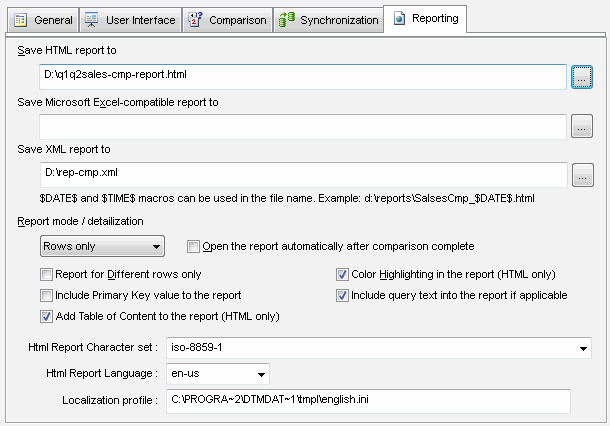
All options will be applied to new reports only and not for the already generated report that available by "Open report" button pressing.