Table of Content
- General
- Advanced
- Additioal Information
Product settings
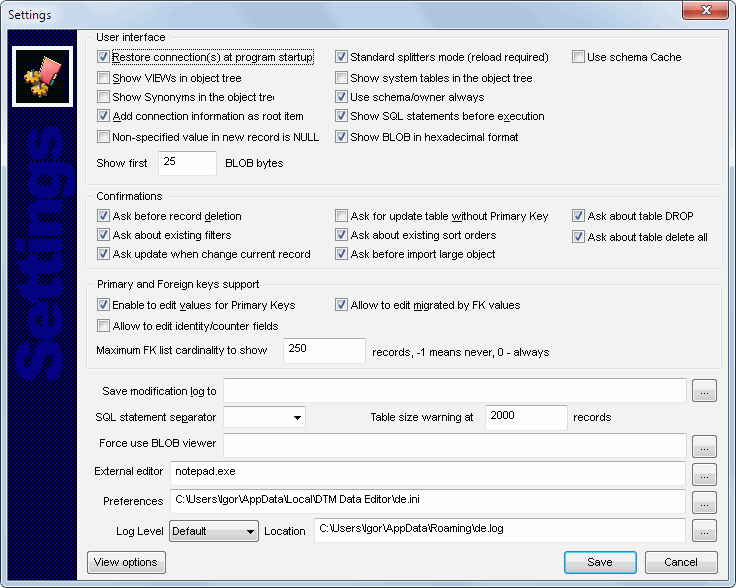
The program has some settings and options to make your work more comfortable. Don't forget to
press "Save" button in "Settings" dialog to save the settings you chose.
The most important settings are:
- "Standard splitters mode" - in this mode the window with the edit form is located under the record list. The alternative value of a parameter corresponds to the way they are arranged in two columns. Important: you will have to restart the program to change this parameter.
- "Ask for update table without Primary Key" - the program displays a warning if you are editing a table having no primary key.
- "Enable to edit values for Primary Keys" - if this option is disabled, the program won't let you edit the value of those fields that are the primary key.
- "Ask before record deletion" - enable/disable a warning before deleting record
- "Allow to edit migrated by FK values" - if you disable this option, the program will allow you to select a value for a linked field only from its list
- "Show VIEWs (SYSTEM TABLEs) in object tree" - show in the list of objects not only tables but also views (system tables)
- "Add connection information as root item" - if you disable this option, the program will not add the root item with the connection information to the tree.
- "Show SQL statements before execution" - if you enable this option, the program will display the created SQL statement and offer you to modify it before adding, updating or deleting the record.
- "Allow to edit identity/counter fields" option allows you to edit the value of fields generated automatically (such as a counter). Important: setting these values manually may cause problems in updating the data.
- "Non-specified value in the new record is NULL" - if this value is set, all NULLable fields in a blank edit form will have the NULL value. If it is not set, they will be filled with empty strings for text fields and 0's for numeric fields. The default values will also be inserted in the form in this case.
- "Table size warning at" - you can specify the number of lines in the table for the corresponding message to be displayed if it is exceeded.
You can specify the maximum number of values (0 means always, -1 means never) in the linked table when a combo box with values should be created. If there are more values in the table than you specify, the edit control will be used instead.
The program can save the history of changes made in it to the file with SQL statements. It happens if you specify the correct file name in the "Save edition log to SQL file" field.