- General Information
- Project Properties
- Database Connection
- Program Settings
- Table Rule
- Advanced Rules
- Built-in Tools
- Advanced Rules
- Additional Information
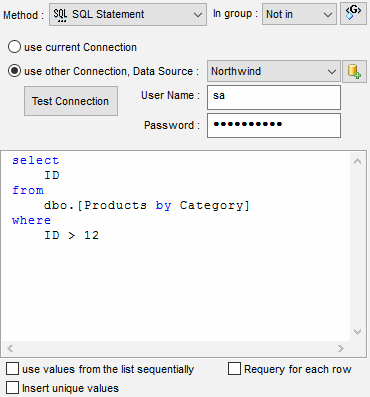
This method is the most convenient one when you want to use the results obtained through using functions built into your DBMS. When the "use first result set's column as a list" option is switched off, independent of the obtained data set, the program will use only the first field of the first record in the results in the generation process. Please refer to fields group feature to use other columns of the result set.
The "Use values sequentially" option instructs the program using list items from the first to the last. When the list ends the program starts from the first item again.
If the "Requery for each row" option is switched on the generator runs the query for each row and uses the first value only. It is suitable for Oracle sequences, unique ID server-side generators, etc.
Note
"Test Connection" button helps the user to verify custom connection properties: DSN, user name and password.
Pattern Engine
$Query function helps the user to access same functionality of the data generation engine.