Table of Content
- General Information
- Project Properties
- Database Connection
- Program Settings
- Table Rule
- Advanced Rules
- Built-in Tools
- Advanced Rules
- Additional Information
Data Generation Methods
There are methods to fill in the fields:
- with random values. More...
- with the values from the list specified by the user. More...
- with the values from the column of another database table specified by the user. More...
- with the values from the file specified by the user (one value per line). More...
- with the incremental values starting from the specified value. More...
- with the values from the Value Library. More...
- ignore field (uses for auto incremental fields such as identity or counter)
- with random values according to the pattern. More...
- with the result of the SQL statement execution. More...
- with values according to the regular expression. More...
- as a Group item. You can not set or change this fill method directly.
- with the Excel spreadsheet. The method helps users get data from Excel spreadsheet.
- with the XML document. The method helps users extract data from XML file for test data generation.
- with the JSON document. The method allows users to provide JSON document as a source.
- by the Script method runs a user-defined script (Python, Ruby, Perl, etc) to generate specific data sets.
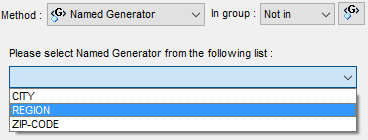
Also, you can refer to Named Generator instead of the immediate specification of the data generation properties.
You should select "Named Generator" from fill method drop down menu for this case.
As to lists of values and lists in a file, the program allows you to use
its special "use sequential values from the list" mode when data will be taken from the list not randomly,
but sequentially in a loop.
Also, the program can interpret the value of the list as a pattern. The "Use list items as a pattern"
checkbox can be used to enable this mode. This option supports for "list", list "from file", "Value Library"
and "From Table" fill methods.
See also: field groups.