Table of Content
- General Information
- Project Properties
- Database Connection
- Program Settings
- Table Rule
- Advanced Rules
- Built-in Tools
- Advanced Rules
- Additional Information
Rule Data, Column generators
This tab helps the user to assign or review data generators for each column of the selected table.
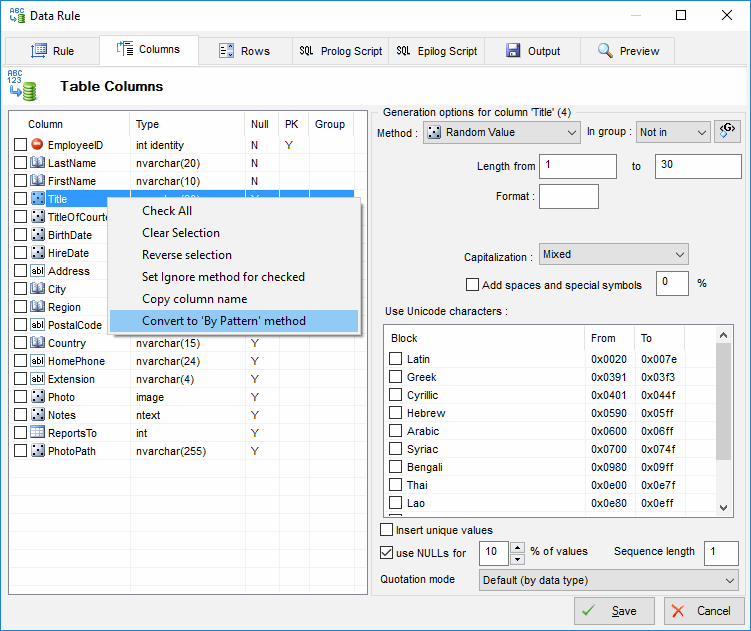
The context menu of the column list allows users to:
- Select, clear or reverse selection of the fields.
- Set Ignore fill method for all selected fields. This option most useful for Update and Scramble modes.
- Convert fill method to "by pattern". The program will generate suitable engine call automatically.
If "Sequence length" (one by default) is greater than one the program will use each generated value a few times instead of generating new value for the new row.
There are three quotation modes:
- By default, the program uses column data type to identify quotation mode.
- No quote should be used in case the program hasn't required information: hex strings with 0x prefix, built-in database functions or other complex cases.
- Quote always. This mode suitable in case the program could not recognize database specific data type.
Note: the program tries to find a pattern or a Value Library item for some well-known field names automatically in order to make the data more realistic. Of course, you can edit automatically created generation rule in the "Data Rule Editor" window.