Product Home
DTM Data Generator Online Documentation Prev Page Prev Page
General
Product Profile
Product Versions
Quick Start
Rule Wizard
System requirements
Connect to Database
Quick Start
Direct Connection
Connect to Desktop File
Data Sources
DSN File
OLE DB Connection
Connection Profile
Connection Information
Troubleshooting Guide
Project Properties
Program Settings
General
Interface
Rule and project
Execution
Date and Time Formats
Execution
Random BLOB Loader
Project migration
Database Model Viewer
Fill Table Rule
Table Fill Modes
Table Fill Options
Tables options
Columns options
Row count tab
Scripts
Rule Output
Preview
Fill Methods
Method Options
Random values
Values list
From table
List from file
From Values Library
Incremental
By pattern
By SQL statement
By formula
Custom generator
Named Generators
Field groups
Advanced Rules
Clear Rule
Tables Creation Options
Objects Creation
File Rule
Advanced Features
Tables Selection
Bulk project modification
Table Information
Value Library
Change target Table
Command Line
Performance Tips
Performance mode
Format Strings
Select column
Data export
How to...
Additional Info
Product Ordering
Database Utilities
Licence agreement
Demo version
Install
Uninstall
Upgrade
Support
Trademark Information
Glossary

Select tables for data generation rules

This window allows you to select one or more table for data generation. For a single table just mark the required object in the list and go over to the next step. In the other case mark the required tables in the list.
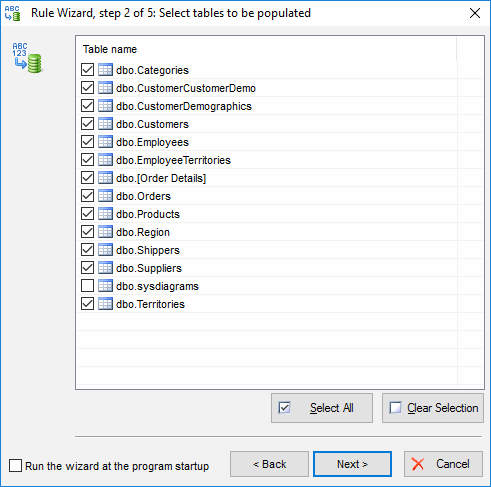
DTM Data Generator: Select tables to be populated by test data

See also: Rule Wizard.