Table of Content
- General Information
- Project Properties
- Database Connection
- Program Settings
- Table Rule
- Advanced Rules
- Built-in Tools
- Advanced Rules
- Additional Information
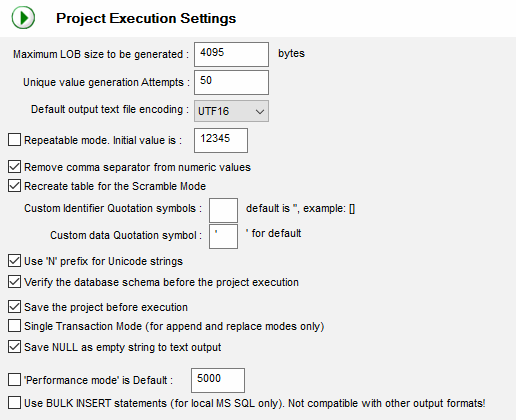
Project execution settings
| Option | Default | Description |
|---|---|---|
| Maximum LOB size | 4095 | The program will not generate large objects longer this value. |
| Unique value generation attempts | 50 | The program stops generation process if could not generate a unique value after this number of attempts. |
| Repeatable mode | Off | The program generates same data for a few runs if this option is switched On and "initial value" is same. |
| Repeatable mode initial value | 12345 | The value that the program will use as a base for the repeatable mode. |
| Remove Comma Separator from numbers | On | This option is useful for external data sources those contain the numeric values with separators like 1,020.50 The program will import 1020.50 is this option is switched on. |
| Recreate table for scrambling | The program will drop and create target table between each scrambling execution. Use existing one otherwise. | |
| Custom quote chars | On | The program will use this symbol (or symbols) to quote names. By default, it will use system symbols (SQL_IDENTIFIER_QUOTE_CHAR). |
| Use 'N' Unicode prefix | On | The generator will add N before Unicode strings when this mode is switched On. Example N'abc' instead of 'abc' |
| Verify database schema | On | The indication that the program must verify database schema before project execution. |
| Save project before execution | On | The generator saves current project to the disk file before the run if this option is switched On. |
| Single Transaction Mode | Off | The generator will execute the whole project as a single transaction. In any rule or statement fails project will be rolled back. |
| Performance mode is default | Off | The generator switches to performance mode with this settings. The program should be restarted. |
| Bulk Insert Mode | Off | The fast mode to load data to local Microsoft SQL Server. IMPORTANT: it is not compatible with another output modes. You should not use this mode together with "Save generated data to Text File" project option. |
Project Execution Options