Table of Content
- General Information
- Project Properties
- Database Connection
- Program Settings
- Table Rule
- Advanced Rules
- Built-in Tools
- Advanced Rules
- Additional Information
Table Fill Modes
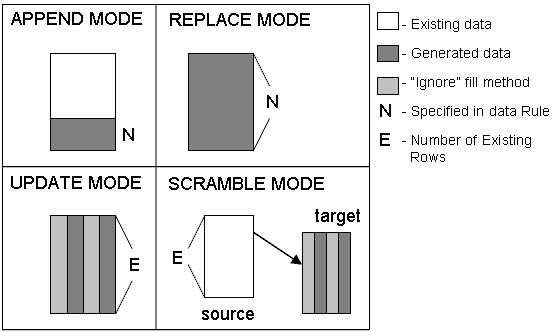
By default ("Append Data" mode), the program will add new records to the selected table. There are three other modes:
- In the "Replace mode", the program removes all data rows before adding new records. An alternative to this mode for a database with a complex set of relationships is using the Clear Rule.
- The third case called the "Update Mode" is the most complicated one. A table must have a Primary Key (PK) in order to use this mode. If the table has no PK, you must manually select a field for searching records to be updated (use the "Unique key" button near the mode drop-down menu to select a column). The program goes through records one by one taking into account the where clause specified for this mode and updates those fields whose fill mode is not Ignore.
- The "Scramble" mode (does not supported by Standard and Professional editions), also known as data making, uses two tables of the same or different databases. The program takes the contents of the first table (considering the value of the WHERE clause) and gets data rows from it sequentially. The values of columns for which Ignore fill method was used are placed in the target table as is. All other values are replaced with values generated according to the used fill methods. In this case, the requirements for the presence of Primary Key or its manual specification in the source table coincide with Update Mode. If the target table already exists, it will be deleted without warning; after that, the program will create a target table identical to the source table.
See also: Data Masking Tool.