- General Information
- Product Features
- Database Connection
- Product Settings
- SQL Builder
- Plug-ins and SDK
- Plug-ins Library
- General Information
- By DBMS
- By Functions
- Editors
- Common
- Preprocessors
- After Execution Plug-ins
- Additional Information
- SQL quick reference
You can load SQL scripts using one of the following methods:
- type the name of the file as the command line argument
- direct file loading
- automatic file loading
- drag-n-drop the file into the main window of the editor
- restore script from the backup copy (after software or hardware failure).
You can perform clipboard operations either with mouse or keyboard or by selecting the items from the local menu that can be accessed by the right mouse button click inside the main window.
Moreover, you can search and replace any items. Undo/Redo functions are also implemented. You can press Ctrl-Z and Ctrl-Y without any worry to lose your work.
There is a picture of local menu accessed by the right click inside the editor window. See the picture below:
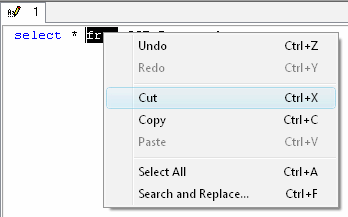
Using this menu you can:
- perform clipboard operations.
- do bulk text operations.
- search/replace.
- execute other additional operations.
Using toolbar buttons You can:
- load and save files.
- start a new file in the new editor window.
- call search and replace dialog.
- perform clipboard operations.
- access to Redo/Undo features.
- print script text.
- call "macros" dialog.
- comment and uncomment script line or selected fragment by the one click.
Using Ctrl+G hotkey you can go to the required line of the current script. Besides product allows you to use bookmark: press Ctrl+<number key> to set bookmark for current cursor position and use Ctrl+Shift+<number key> for go to the stored bookmark. You can define up to 10 ('0'-'9') bookmarks. Bookmarks are script-specific and SQL editor does not save them between sessions.
To comment the current line out or to uncomment it, just press the button with two "minus sign" on it. To comment out a block, select it and press the button with a slash and an asterisk on it. If you press this button when the cursor is in the commented area, it will be uncommented.
Adding plug-ins to the DTM SQL editor helps users to extend the functionality of the editor tool (PT_TEXT plug-in type). It is also a possibility for the third party developers wishing to make additions to the program.
See also: "macros: definition and use", "search and replace"