 |
SQL library |
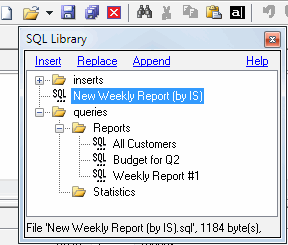
The SQL library is the perfect way to organize your SQL scripts. SQL library is a hierarchy of files and folders. You can add a script to the library using Windows explorer. You can also save the script from DTM SQL editor into SQL library.
To access SQL library click arrow near "Open" toolbar button and select "SQL library" item from the drop-down menu.
The default location of the library is "library" subdirectory in the product folder. For example, "C:\Program Files\SQL editor\Library". You can change this value using settings dialog
The SQL script selected in the library can be saved using one of the following methods:
- Insert - insert the file at the current cursor position.
- Append - append the SQL file to the end of the script currently being edited.
- Replace - replace the current script.
© Copyright 1998-2018 DTM soft.