Table of Content
Execution Console
The execution console is a list of the executed items of the project and. Also, it contains the summary for the state of the events. It allows you to view execution process and results of the project execution.
Event status definitions:
- Started - event procedure has been started by the internal event manager.
- Paused - event is waiting for the first or next execution.
- Paused by the user - the user pressed "Pause" button.
- Executing - check of the event is executing now.
- Check passed - check of the event was executed successfully.
- Check failed - at least one error occurred.
- Do action - specified action executed.
- Action Error - error occurred during action execution.
- Action Skipped - action skipped by check condition.
- Completed - all done
- Cancelled - user pressed "Break" button.
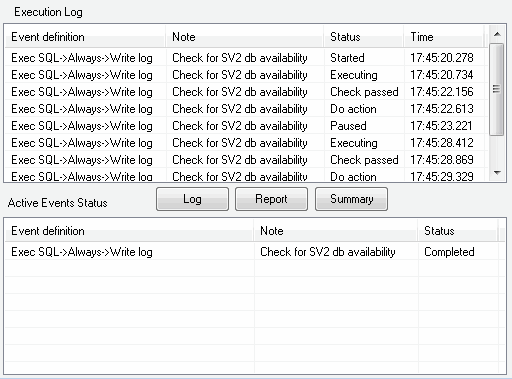
This window also allows the user to save the log file, execution report, and summary report.