Table of Content
- General Information
- Rules
- Additional Information
Product Settings
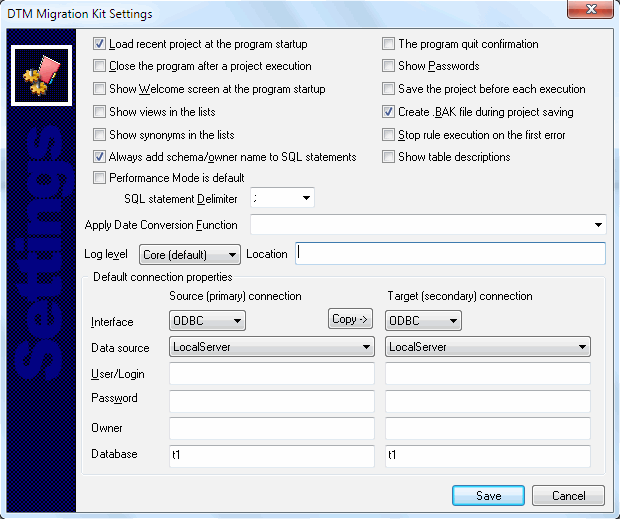
The program has some settings and options to make your work more comfortable. Don't forget to press "Save" button in "Settings" dialog to save the settings you chose. The most important settings are:
| Option | Default Value | Description |
|---|---|---|
| Load recent project | Yes | The program will not load recent project at the startup if this option is switched OFF. |
| Quit application after project execution | No | The program will stop after project execution when this option is switched ON. |
| Show Welcome screen | Yes | Open or no welcome screen at the program startup |
| Program log level | Default | This option allows users to tune log from "disabled" to "full" mode. |
| Default connection properties | Empty | This option defines default connection for new rules. It can save a lot of time when you operate with same database connection again and again. |
| Quit confirmation | No | The program asks for quit confirmation if this option is switched ON. |
| Show password | No | The program will not replace password to '*' when this option is switched ON. |
| Save project before each execution | No | The program saves an active project before each execution when this option is switched ON. This option is suitable for "Quit application after project execution" option. |
| Create .BAK file | Yes | The program moves existing project to .bak before overwrite it. This option allows the user to disable this behavior. |
| Show views and synonyms | No | By default, the program shows only tables in the object lists. These two options allow the program to add views and synonyms. |
| Stop on the first error | No | The program stops rule execution on the first rejected SQL statement when this option is switched ON. |
| Always add schema name | Yes | When this option is switched ON the software does not add schema/owner prefix to schema name. |
| Show object description | No | When this option is switched ON the software adds existing comments/descriptions to object lists. |
| Performance mode is default | No | This option switches the program to performance (or "fewer diagnostics") mode. Another way is to use -p command line switch. |
| SQL statement delimiter | Empty | Project level SQL statement delimiter. The rule level option can be specified at the related page of the wizard. |
| Log file location | Empty | Empty string means product directory. The user allowed to specify alternate path and file name. |
| Date conversion function | Empty | This built-in conversion function will be applied to any date before insertion into target database. It is suitable for different date/time formats of primary and secondary databases. |
| Default connection properties | N/A | This options block allows the user to define default connection. Any new rule will inherit these properties. |