- Product Profile
- Connect to Database
- Versions
- Comparison Process
- Compare Text Dialog
- Comparison Report
- Performance
- Hot Keys
- Project Wizard
- Project Properties
- Synchronization Script
- Program Settings
- Command Line Switches
- SQL Console
- Database Utilities
- License Agreement
- Demo and Full Versions
- Product Ordering
- Install
- Uninstall
- Upgrade
- Support
- Trademark Information
- Glossary
DTM Schema Comparer is a tool for database schemas comparison and synchronization. The comparison process supports
tables (with columns properties like data type, size, defaults, etc), views, indexes, triggers,
primary and foreign keys and stored procedures. The visual representation of database schemas
as a tree makes the comparison process more comfortable. The built-in SQL text
comparison tool allows you to view two scripts with differences displayed in a comfortable way.
The synchronous navigation through the schemas tree allows you to easily compare items in as detailed
way as you need.
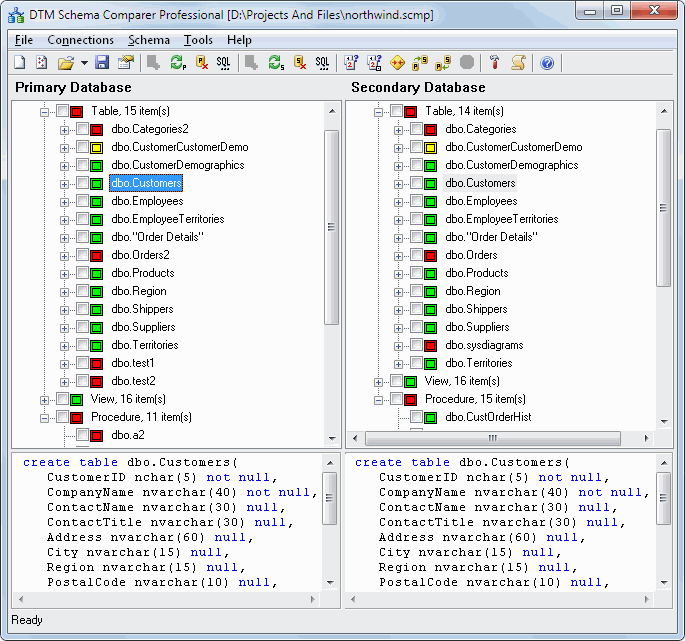
The main window of the tool contains database schemas in the form of a tree with icons for displaying the comparison results or '?' signs if the comparison process is not completed yet. The legend of icons is described below. The text boxes show the texts of the database objects currently selected with the syntax highlighting feature. The SQL window shows text for the currently selected database object (table, view, procedure, etc.). Also, you can open the "SQL text comparison tool" window using the 'Compare texts' button.
There are four icons for nodes in the schema tree. The question sign means the comparison process is not completed yet. If you are already connected to both databases, click the "Compare" button to start the process. Please be patient, the comparison process for complex schemas may take several minutes or (for thousands of database objects) even dozen minutes. The red icon means objects (or their child objects) are not equal. The yellow icon means objects have the same name, but different internal structure. The green icon means objects are equal.