Table of Content
- Product Profile
- Connect to Database
- Versions
- Comparison Process
- Compare Text Dialog
- Comparison Report
- Performance
- Hot Keys
- Project Wizard
- Project Properties
- Synchronization Script
- Program Settings
- Command Line Switches
- SQL Console
- Database Utilities
- License Agreement
- Demo and Full Versions
- Product Ordering
- Install
- Uninstall
- Upgrade
- Support
- Trademark Information
- Glossary
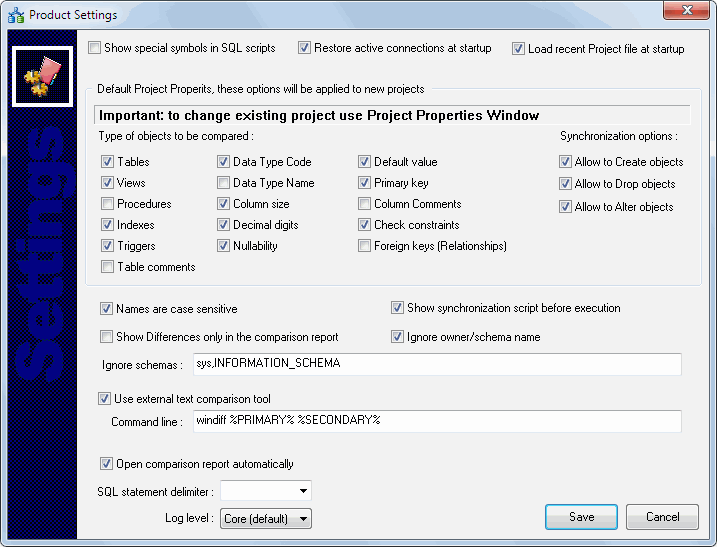
Product Settings
The program has some settings and options to make your work more comfortable. Don't forget to press "Save" button in "Settings" dialog to save the settings you chose.
There are two group of settings: general options and default project properties. The second group of settings is applicable to new projects only. To modify existing projects the user have to use project properties window.
The first settings group contains:
| Option | Description | Default |
|---|---|---|
| Show special symbols | The program will show spaces and special symbols in the scripts if the option is switched on | No |
| Restore active connection | The program establishes recent connection automatically to reflect this option | Yes |
| Load recent project | The program loads recent project file automatically to reflect this option | Yes |
| Names are case sensitive | The program will ignore case if the option is switched off | Yes |
| Show Synchronization script | The program runs synchronization script without preview if the option is switched off | Yes |
| Show differences only in the report | The program shows equal objects in the report if the option is switched off | No |
| Ignorer owner/schema | The program does not use schema name in the comparison if the option is switched on | No |
| Use external test tool | The option allows users to specify external* text comparison tool instead of built-in one. | No |
| Open report automatically | The program open default web browser with the comparison report if the option is switched on | Yes |
| Statement delimiter | The program will add this string after each SQL statement of the synchronization script | Empty |
| Log level | Logging option | Core |
* - the user should provide a complete command line for external tool execution. The full path is recommended.