How does the data cleaning process work?
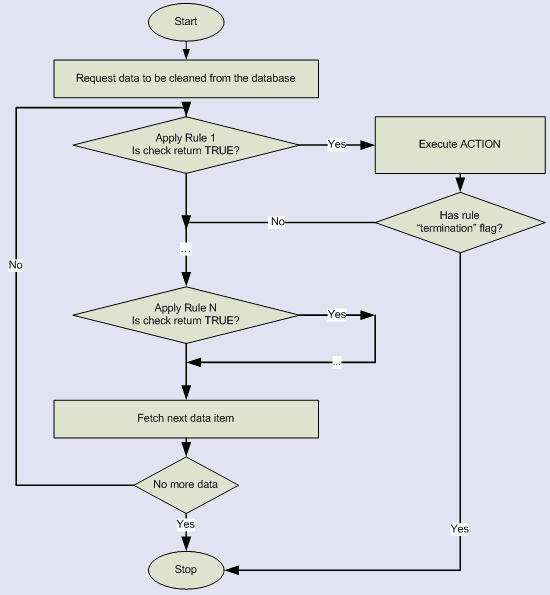
The data cleaning process consists of a few steps. They are:
- Data request. The program selects data from the database and builds a result set.
- Clearing report preparation. The program opens report file and writes summary information: connection information, execution time, etc.
- Data fetching. The program fetches selected data sequentially from the first to last row.
- Data item clearing. See below.
- Release result set and close verification report.
- Show data clearing SQL script to the user (except console mode).
- Execute data clearing SQL script against the connected data source.
Data Item cleaning
For each data item, the scrubber applies one or more data rule. The data rule has information about data item (table, field, etc.) suitable for the rule.
If the check returns positive value the data item marked as "wrong" and user defined "action" be applied to the item. The scrubber generates SQL statement based on defined in the rule "action".
Options
- The user can run only one cleaning rule against the data set. In this case, only one check will be applied to each suitable data item.
See Also
- How does the data verification process work?
- Data Audit