Product Home
DTM Schema Inspector Online Documentation Prev Page Prev Page
General
Product Profile
Connect
Quick Start
Direct Connection
Connect to Desktop File
Data Sources
DSN File
OLE DB Connection
Connection Profile
Connection Information
Troubleshooting Guide
Settings
Filter
Search
Object Tree
Operations
Export schema
Requirements
SQL console
Tips and FAQ
Troubleshooting
Additional Info
Product Ordering
Database Utilities
Licence agreement
Demo version
Install
Uninstall
Upgrade
Support
Trademark Information
Glossary

Filters usage

The schema browser allows you to set filters for the objects displayed in the tree-like manner. Filters can have the same parameters as the search.

Be careful with filters, you can set such a filter that there won't be any objects displayed. Should this happen, exit the program and restart it - the product does not save filters upon exiting.
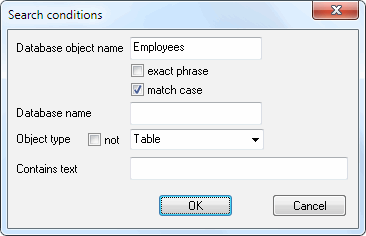
DTM Schema Inspector: filter properties window

Note: filter is not applying to collections (node items) and databases (Microsoft SQL Server only).