How to manage database object descriptions?
The object's description is a text that describes the table, column, view, procedure or another object. It can contain purpose, usage definition or another information by system architect or database developers.
The professional version of the schema documenting software supports all stages of the description lifecycle when standard edition allows the user to import comments from database and edition only. There are three stages: import, modification, and export.
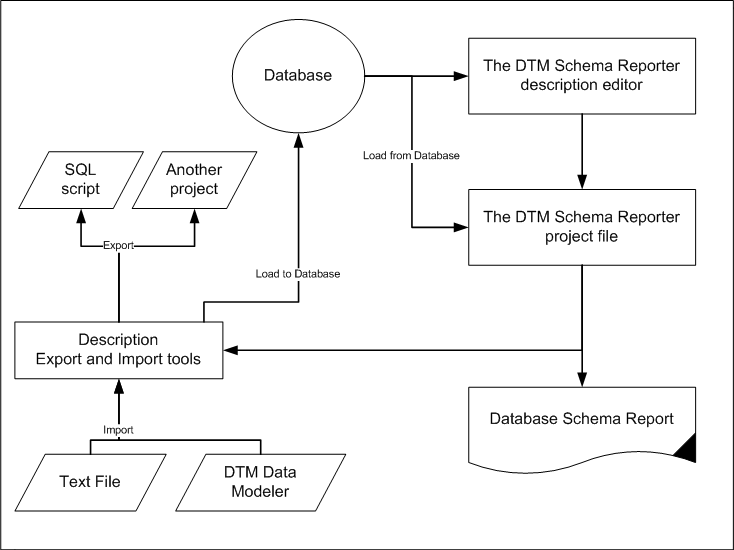
As mentioned above the standard edition can import descriptions from the database only. The professional offers three alternative sources:
- Text file with descriptions delimited by "tab", comma or another separator.
- DTM Data Modeler project file.
- Another DTM Schema Reporter project file.
Any DTM Schema Reporter edition allows the user to modify descriptions for the tables, views, columns, procedures and functions, synonyms. However, only professional edition has an export function. There are three export targets:
- Save changed or entered descriptions back to the database. The program uses the active connection in this case.
- SQL script. For this case, the reporting tool generates a set of SQL statements that add, modify or remove descriptions for existing database objects.
- The third target is another DTM Schema Reporter project. This option is most useful for users who have a few projects for the same database schema like test and production environments.
The following schema illustrates object description management lifecycle in DTM Schema Reporter