- General Information
- Advanced Options
- Additional Information
DTM Schema Reporter allows you to select tables which will be added to the report. Press "Tables" button at the main window to open the corresponding dialog. By default, all tables are on. You can remove any table from the report by unmarking a checkbox near the table name.
Also, you can add small text descriptions for tables and columns:
- To set or update a description, select the table (or column) and double click. Enter text in pop-up window and select OK
- To clear a description, select the table or column and enter an empty string in the pop-up window.
Use "Select all" and "Clear selection" buttons to mark all tables in the list or to remove the selection for all tables. Moreover, the user can select required tables by case sensitive mask (name substring) using related edit box and button.
You can use "Up" and "Down" buttons for move table position up or down in the list. Then the tables will be presented in the report in the corresponding order.
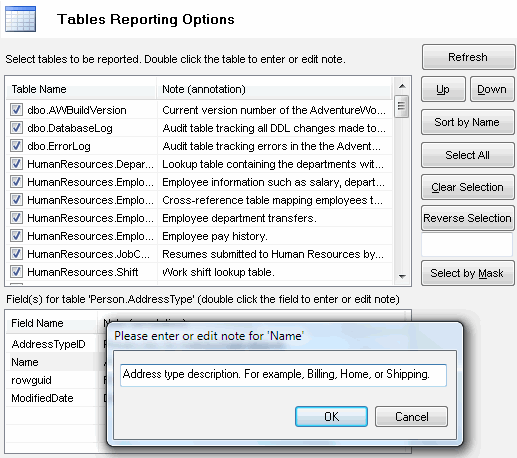
The dialog saves the sizes and positions of windows either for the current session or between sessions.
Important: the program uses table list selection in the report only, not in the entity-relationship diagram.
See also: about descriptions.