Product Home
DTM DB Stress Online Documentation Prev Page Prev Page
General Information
Product Profile
Product Versions
Execution Modes
Task Properties
General Properties
Task Options
Parameters
Task Connection
Task Scripts
Group of tasks
Execution Console
Execution Reports
Data Generator
Project Properties
Connect to Database
Quick Start
Direct Connection
Connect to Desktop File
Data Sources
DSN File
OLE DB Connection
Connection Profile
Connection Information
Troubleshooting Guide
Statistics
Settings
General
Task
Reporting
Diagram
Log Viewer
Hot Keys
Advanced Options
Dynamic Statements
Command Line
Performance Counters
Show Execution Plan
SQL Library
Report Comparison
Report Cutomization
Version Controls
Import Script
SQL console
Report Visualizer
Additional Information
Installation
Uninstall
License
Demo and Full versions
Technical support
How to order
Upgrade
Trademark Information
Database utilities

Desktop File Connection

Desktop Files

The second way is designed for connecting to desktop data files. Select the required format and specify the file name or the directory where the data is located. Other parameters are optional.
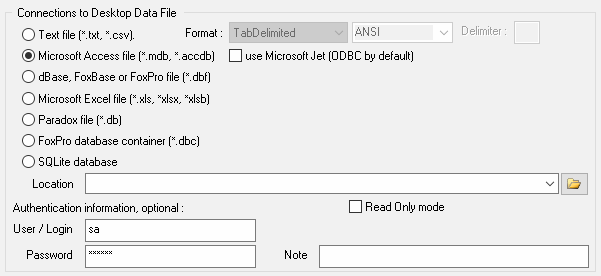
desktop file connection properties