Table of Content
- General Information
- Advanced Options
- Additional Information
Stress project execution modes and methods
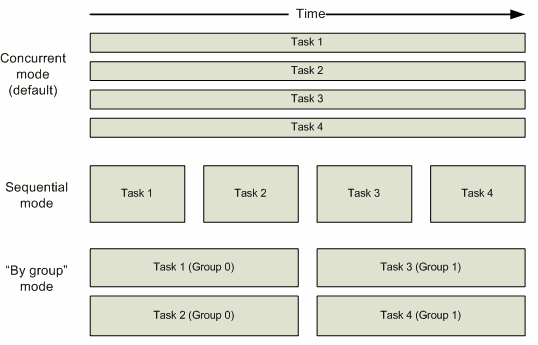
There are three execution modes: concurrent, sequential and 'by group'.
There are several methods to finish a project (job):
- Manual, when the user himself has to click the Stop button at the execution console or toolbar.
- According to the properties of each task - each copy of each task is executed as many times as specified in its properties.
- By time - all tasks will be running at least for the number of seconds specified by the user. The control precision is about 0.5 seconds for this method.
- By the overall number of executed iterations. A project is finished if the overall number of iterations for all copies (threads) of all tasks exceeds the specified value.
- By the number of times each task is executed. A project is finished when each copy (thread) of each task is executed the specified number of times.
- By the number of times each thread is executed. A project is finished when thread copy of each task is executed at least the specified number of times.*
* - this method is not compatible with 'sequential' and 'by group' modes.
All or checked threads can be paused. To continue execution use the same Pause/Continue button.