- General Information
- Advanced Options
- Additional Information
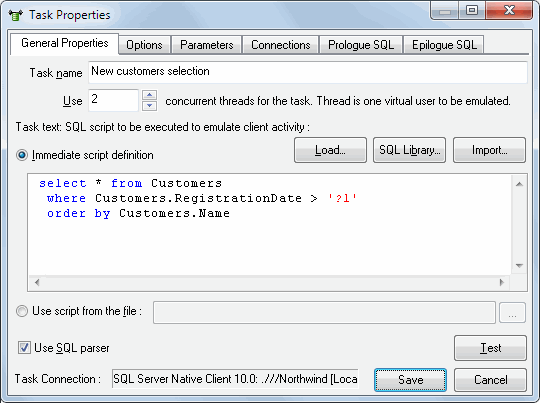
This dialog box helps you to set general task properties. The most important properties are:
- Task name - displayed in the task list in the main program window.
- A number of concurrent threads the program should create for a task of this type.
- The text of the SQL statement representing the content of the task - it is exactly what will be executed within this task. You should switch on "Use SQL parser" option in case you want to use complex script (set of SQL statements). "go" or ";" statements separators are recommended. There are two ways to specify SQL script: immediately entering or external file reference.
Also, this dialog box allows you to load an SQL statement from a file on the disk (the "Load" button), from SQL Library and to test if the current statement is correct (the "Test" button).
The stress tool allows you to select one of three ways to use the file with data. In the first case, all task threads use the file with data independently. It means that they open the file on their own and sequentially process records in it. In the second case, each thread uses only one set of values (a string with data) from the file. In this case, the number of strings in the file with data must coincide with the number of threads launched for the task. The third way is when all threads read from the file sequentially.
"Use SQL parser" option instructs the tool that source SQL script should be split to a few SQL statements. The program executes it sequentially in this case.
When the option is switched off (by default) DTM DB Stress passes the whole script to database directly.
"Run the whole script as a single transaction" works together with "SQL parser". If the option is switched on the stress tool start transaction at the begin of the script execution and commits it and the end. Otherwise, the program uses "autocommmit" mode, i.e. each SQL statement is one transaction.
Note: the user can specify default values for most important task properties at Settings window.
See also: import SQL script feature.