Performance is one of the most important problems during migration process. DTM Migration Kit offers a few methods for database operations like data migration. These methods are not equal if performance is considered. Also, few product settings can influence the performance as well.

At first, let us review performance related factors and difficulties that user faces during data import. A significant factor is presence of indexes and triggers for destination table except when the program creates the table itself. In case the trigger for INSERT is present your database system will call it after each inserted row. It may decrease import performance extremely. The simplest way to avoid the problem is to disable all triggers for your target table when import works. Another way is to drop triggers and to recreate them after the execution is complete if your database does not allow you to disable triggers temporarily. It is a good idea to use "Execute SQL script" rule of DTM Migration Kit to disable/enable or to drop/create triggers.
Triggers
To demonstrate the influence of a trigger we've ran two tests with and without a trigger. During the test we loaded one million rows from the text file into Microsoft SQL Server 2000 table. Our trigger was dummy, it runs the simplest SQL statement like "select getdate()".
| Without trigger | With trigger | |
|---|---|---|
| Performance, rows per second | 540 | 522 |
As you can see, even the simplest trigger can decrease import process performance for 3-4%.
Indexes
The next item is the presence of unique and clustered indexes. After each inserted row (or committed set of rows) your database system will update indexes of the table. As in example mentioned above, we've ran two tests:.
| Without index | With index | |
|---|---|---|
| Performance, rows per second | 533 | 523 |
Transaction Size
There are two methods of import data from such external data sources as text file, spreadsheet or desktop database. The program can insert records row by row or collect a set of INSERT statements to transaction. Let's investigate how length of the transaction influences the performance of our data import process.
| Transaction Size | Performance, rows per second |
|---|---|
| One row per transaction ("automatic commit" mode) | 422 |
| 10 rows | 528 |
| 100 rows | 533 |
| 500 rows | 528 |
There are no general recommendations for optimal transaction size selection. It depends on the type and version of your database management system, target table structure, level of available system/server resources, etc.
Import Methods and Integrity Checks
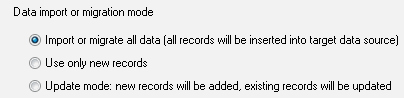
Let us now consider import methods for loading data to a single table. They are:
- Import all records
- Import new records only
- Update mode
The first method is quickest because the program should not make any data checks before import. In the second case the program checks any data row from the source file for existence in the destination table. All the existed rows will be skipped. Of course, each test requires some time to execute and this method slower than the first in any case. The last method similar to the second except that program updating existing rows instead of skipping them.
Both the second and third methods are slower for large tables than the first one. Try to use only the first import method if it is possible. Let database server reject duplicated data instead of using the second way. Consider removing some data before import instead of using the third way. Any workaround can increase import performance.
Check constraints are probably a bottleneck of the import performance. Better idea is to remove them temporarily and to delete wrong rows from the target table after import. For example, if you have "ID>0" constraint, try to import all rows and to run following SQL statement: delete from TableName where ID>0.
Foreign keys and integrity checks represent a more difficult problem. Unconditionally, your database server checks each data row before the insertion if integrity rules are defined. Perhaps, this operation is resource-greedy in your case. We recommend removing foreign keys until import or migration is complete if you are sure that your source data is correct and consistent.
Another way is to save integrity rules as is. The order of tables import is critical in this case. You must import master (parent) table before detail (child) table(s). Otherwise, your database system will reject detailed rows without master rows.
All our suggestions for import can be applied to the migration process too. You should use them for the target table.
In addition, we'll discuss the usage of data transformation and conversion functions in the data
migration process. As you know, the migration tool offers two conversion methods: built-in conversion
and transformation function or procedure specific for your database. Built-in functions are more
effective in most easy cases like format conversion.
Please note that you have no alternative for complex conversion like changing date and time format.
In this case, you should consider migration data as is and to change required formats after import or
migration process will be completed.