Database Schema Reporting Software Overview
DTM Schema Reporter is a documenting tool for database schema. This utility helps technical writers, developers, and database administrators create a database schema report within seconds. With DTM Schema Reporter the user can analyze and audit database structure, create schema documentation, train your employees, create a hard copy of the structure snapshots, etc.
Download free demo : Standard or Professional
Key Documenting Software Features
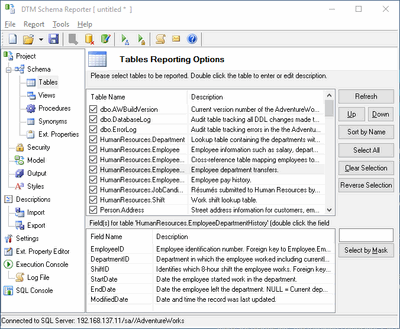
- Database independent. The user can create schema report for Microsoft SQL Server database as well as for Oracle or for Interbase. The software product supports all common database interfaces: ODBC, IDAPI, OLE DB, or Oracle Call Interface.
- The product allows users to include the following objects to the report: tables (with detailed columns information), views, indexes, foreign keys, triggers (with type and status), procedures, defaults, rules and roles. Moreover, the program helps you to add to report DDL statements for database objects.
- Annotations support. The user can make your database schema reports more friendly by adding notes for your objects in automatic or manual mode.
- Objects selection support. This SQL documentation tool supports styles and fonts customization for RTF reports as well as CSS-based customization for HTML/CHM schema reports.
- Unattended report generation feature is a way to run the software under schedulers.
- DTM Schema Reporter is a software that supports Windows XP/Vista/7, Windows 8/10 (desktop), Server 2003/2008/2012/2016.
Why DTM Schema Reporter
- Most complete set of output formats. You can create database schema documentation in RTF (Microsoft Word and Open Office compatible), plain text, PDF, CHM (Windows HTML Help), XML, Microsoft Excel or HTML format.
- Extra reports. The Security report with detailed information about accounts, logins and rights to database objects helps a DBA or a security administrator to manage database access more effectively.
- Descriptions Loader helps the user to load descriptions/comments for tables and columns into a database.
- Extended Property Editor allows the user to add, modify or remove extended properties for SQL Server objects.
- Multi-format schema report feature saves your time. You can get schema or security report in a few formats at once.
See Also
- How can a documenting tool help me?
- Quick DTM Schema Reporter Tour
- How does documenting work?