- General
- Product profile
- Connect
- Comparison
- Warnings
- Synchronization
- Table to Table Mode
- Query to Table Mode
- Query to Query Mode
- File to Table Mode
- File to Table, Fixed width
- Excel to Table Mode
- Database Mode
- Synchronous Navigation
- Face-to-Face View
- Key Definition
- Column Mapping
- Settings
- Project Properties
- Script Viewer
- Command Line
- Console Mode
- Process Cancellation
- Comparison Report
- Report Customization
- Collate Window
- Table List Menu
- Run SQL statement
- SQL Console
- Hot Keys
- Information
The mapping feature allows comparing two tables that have different structure (number and name of fields).
You should select fields of the primary and secondary table in the dialog box and click "Map column". To delete column association you don't need, you should select them in the mapping list and click "Unmap". Using control or shift keyboard buttons you can select and remove a few associations at once. "Clear Map" removes all column maps.
Please be sure that you cave correct primary key correspondence. If the primary key column mapped to the primary key column that program shows green
key ( ). Otherwise, i.e. key mapped to the non-key column it shows yellow
key (
). Otherwise, i.e. key mapped to the non-key column it shows yellow
key ( ).
).
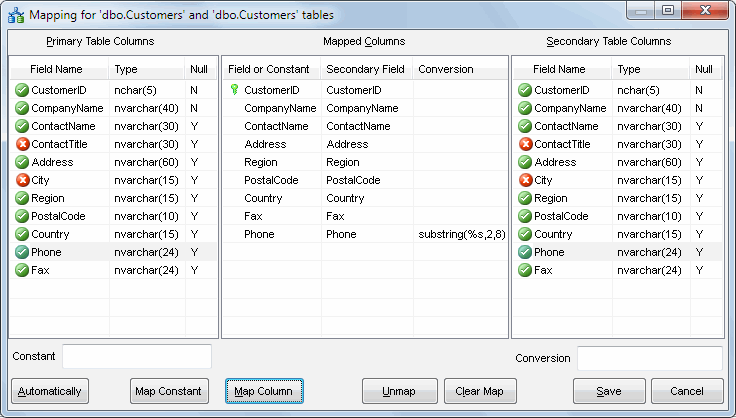
The map constant value feature allows the user to fill secondary table by predefined value during synchronization or to compare the secondary column with a constant value. In this case, the program compares the secondary value with predefined constant instead of column's value from the primary table. Please enter a constant value, select secondary column name and press "map constant" button to create this type of map. It is important to quote entered value if necessary (strings, dates, etc). For NULL value you should use <NULL> string.
"Automatically" map feature creates the mapping for columns with the same name automatically.
Conversion Feature
The program allows the user to apply built-in database function of the target database for some columns.
It is most useful for custom format conversion like date, time, etc.
To apply conversion function please:
- Select source and target fields
- Enter conversion expression into "Conversion" field. You should use '%s' instead of actual field name, for example CAST(%s AS decimal(10,5))
- Click "Map column" button.
Notes:
- The program shows mapping button at the toolbar pressed if mapping specified for current pair of tables:

- The mapped columns are marked by the green icon when not mapped by the red one.
- You may map a column more than once for the complex table to table relationships.