Product Home
DTM Data Editor Online Documentation
General
Product profile
Connect to database
List of tables
Table rows
Record editor
Advanced
Record filter
Search feature
Show SQL dialog
Sort order dialog
Link field description
View options
Program settings
Hot keys
Additional information
Licence agreement
Product ordering
Demo and full versions
Install
Database utilities
Uninstall
Upgrade
Support
Glossary

Show SQL statement

This optional dialog allows you to view and to edit generated SQL statement (INSERT, UPDATE or DELETE) before execution.
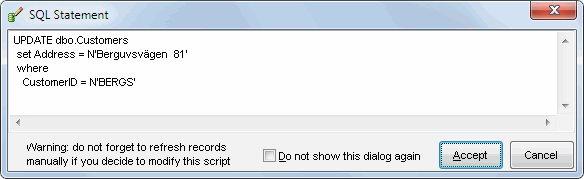
Show SQL dialog screenshot

Note: if you make changes in a SQL statement automatically generated by the program, there is no guarantee that the results will be displayed correctly. Use the "Refresh row list" command ("Record" menu) to update the data on the screen.