- General Information
- Project Properties
- Database Connection
- Program Settings
- Table Rule
- Advanced Rules
- Built-in Tools
- Advanced Rules
- Additional Information
A group of fields is a few columns for which data is generated together. A group allows the user to work with similar fields changing generation parameters only in one place. A group consists of the first defining field and fields that depend on it.
A group is processed depending on the fill method applied to the defining field:
- For methods "Ignore", "Random", "By pattern", "List", "Incremental", "From Table" and "Value Library", exactly the same methods and generation parameters that are applied to the defining field are applied to dependent fields.
- For methods "By SQL statement" and "List from disk file", not only the first column in the file or the result set, but also columns following it will be used. Values in these columns will be used to generate dependent fields.
To create a group, select the unique group number from the drop-down "In group" menu. To delete a group select "Not in" in the same drop-down. To add depended column to created group select same group number and "group item" as fill method.
Example
You have a pipe-delimited text file (coutries_with_currency.txt) with country and currency list in the following format:
Australia|Australian Dollar
Belgium|European Euro
Brazil|Brazilian Real
...
You have two fields "Country" and "Currency" in the "Countries" table. How to fill them out together:
| Step | Description | Screenshot |
|---|---|---|
| 1 | 1) Use "from file" fill method for the first (Country) column. 2) Select file with mentioned data. 3) Select pipe as column separator. |
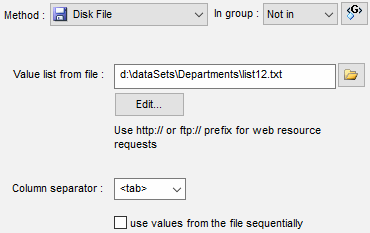 |
| 2 | Select new group in the "in group" menu | 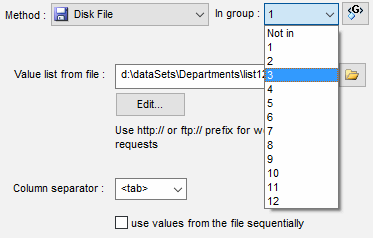 |
| 3 | Select "group item" fill method and attach column to same group (#1) | 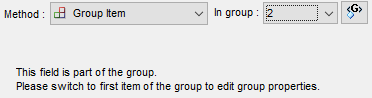 |
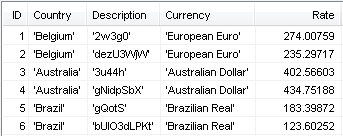
| 4 | View results at the preview Window. "Country" and "Currency" columns are coordinated. |
 |