- General Information
- Project Properties
- Database Connection
- Program Settings
- Table Rule
- Advanced Rules
- Built-in Tools
- Advanced Rules
- Additional Information
Incremental and decremental fill methods are applicable to an integer, date and time data types only*. The initial value and step are most important options of this fill method. For date and time columns "increment by" option is also important.
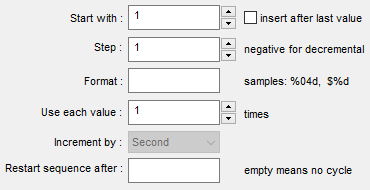
There is complete set of settings for this filling method:
| Option | Default | Description |
|---|---|---|
| Starting with | 1 | Initial value and begin of cycle value |
| Step | 1 | Positive or negative** integer. The program will add it to current value at each iteration |
| Format, for integer only | %d | Value presentation format |
| Use each value | 1 | The program can use one generated value more than one time. This option defines number of same values at the output |
| Increment by, for date and time only | Day or Second | Step value meaning: day, month or year for date and second, minute or hour for time |
| Restart sequence after | When sequence exceeds this value the program will start it from "Start with" value once again | |
| Insert after last | Off | The option means find the maximum existing value of the column and start with next one. By default, it will use "Starting with" value specified by the user. The option is applicable to numeric columns only for now. |
Examples
| Start | Step | Use each | Cycle | Format | Sample value sequence |
|---|---|---|---|---|---|
| 5 | 3 | 2 | 0 | %03d | 005,005,008,008,011,011,... |
| 1 | 1 | 1 | 5 | 1,2,3,4,5,1,2,3,4,5,1,2,3,4,5,... | |
| 1 | 2 | 2 | 6 | 1,1,3,3,5,5,1,1,3,3,5,5,1,1,3,3,5,5,... |
Notes
The variables as Start and Step properties of the fill method are acceptable.
* the data generation engine allows you to use incremental for symbol and numeric/float data types.
** negative step supported for integer values only. Use $IncDate and $IncTime functions of the data generation engine instead to create decremental date or time sequence.
Pattern Engine
The engine provides following functions for incremental data generation: $Inc, $IncDate, $IncTime, $IncChar, $IncFloat. Most of them allow you to use non-constant parameters for starting value and step.