Table of Content
- General Information
- Project Properties
- Database Connection
- Program Settings
- Table Rule
- Advanced Rules
- Built-in Tools
- Advanced Rules
- Additional Information
Random data generation method
There are settings for this data generation method:
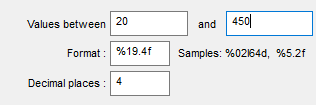
- "From" is minimum value that will be generated for numeric (integer, float, etc) or date/time column.
- "to" is maximum value that will be generated for numeric or date/time column.
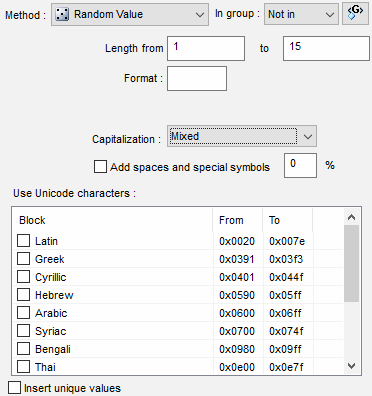
- "Length from" and "to" define length range for string values.
- Format defines the view of value. This option is applicable for numeric values only.
- "Decimal places" defines a number of decimal digits after the dot in the values. This option is applicable for numeric non-integer values only. For example, 2 for this option will produce values like 1.23, 55.70, 2.43, etc.
For the "char" and "varchar" columns the user can specify extra settings: special characters usage or Unicode blocks (for Enterprise version only).
Notes
- You can define year range for Date values using related settings.
- Default decimal places option helps you to change default (zero) value for this fill method property.
- You can use variables for "from" and "to" properties.
- You can define default length range for string columns using related options.
- You can change or define your own date and time format as well as date/time separator at the Settings window. The program tries to analyze acceptable format automatically when the Rule Wizard works.
- Custom Date Conversion function can be defined in the settings and will be applied to any date value before INSERT or UPDATE execution.
Pattern Engine
$Rint, $Rfloat, $RDate, $Rtime, $RString and $Text functions of the data generation engine provide more options for random data creation.